
Overview
Data is a Linux machine that demonstrates how a vulnerable Grafana instance can expose sensitive local files, leading to password hash recovery and an initial SSH foothold. Privilege escalation comes from overly permissive sudo access to docker exec, which allows us to enter a privileged container as root, mount the host filesystem, and modify files on the host for full root access.
Attack Chain
- Identify exposed services with
nmap - Discover Grafana running on port
3000 - Exploit
CVE-2021-43798to read local files through Grafana plugin paths - Download and inspect
/var/lib/grafana/grafana.db - Extract Grafana user password and salt values from the SQLite database
- Convert the Grafana hashes into a
hashcat-friendly format - Crack the password for
boris - Reuse the credentials over
SSH - Enumerate
sudoprivileges and identifydocker exec * - Enter the Grafana container as root
- Abuse privileged container access to mount the host filesystem
- Modify the host
/etc/passwdfile and create a root-level user - Switch to the new user and read the root flag
Enumeration
Port Scanning
We start by defining the target and running a full TCP port scan to identify the exposed services.
export IP=10.10.118.128; export NAME=DATA; echo $IP; echo $NAME; ping $IP -c 1

nmap --min-rate 4500 --max-rtt-timeout 1500ms $IP -Pn -p- -v -oA scans/nmap_allports_$NAME

ports=$(cat scans/nmap_allports_$NAME.nmap | grep '^[0-9]' | cut -d '/' -f 1 | tr '\n' ',' | sed s/,$//); echo $ports

nmap $IP -p$ports -sC -sV -oA scans/nmap_initial_$NAME -v
The open TCP ports are:
22,3000

Findings
The scan results show a small attack surface. SSH (22) is open, but we do not have credentials yet. Port 3000 is running an HTTP service, which becomes the first target for enumeration.
Web Enumeration
Grafana on Port 3000
Browsing to port 3000 reveals a Grafana login portal running Grafana v8.0.0.

This version is interesting because Grafana versions 8.0.0 through 8.3.0 are affected by CVE-2021-43798, an arbitrary file read vulnerability in plugin asset paths. The vulnerable pattern involves requests to /public/plugins/<plugin-name>/, where path traversal can be used to read files from the filesystem.
Testing Arbitrary File Read
To test the issue safely, we send a crafted request through Burp Suite using one of the vulnerable plugin paths.
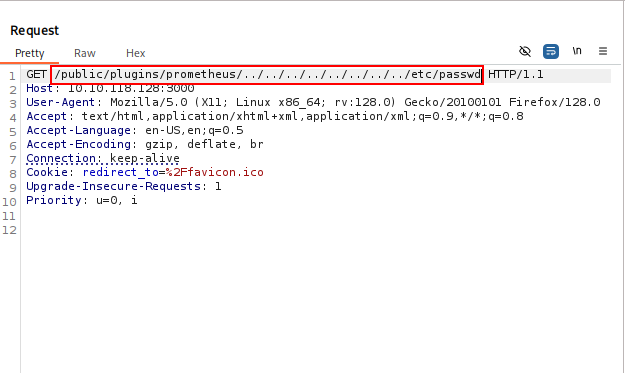
The response confirms that arbitrary file read is working.

With file read confirmed, the next target is Grafana’s local SQLite database at /var/lib/grafana/grafana.db, as this often contains users, password hashes, salts, and data source configuration.

The database is successfully retrieved.

Foothold
Inspecting the Grafana Database
Many public exploit paths for this vulnerability focus on the data_source table because it can contain encrypted datasource credentials. In this case, that table is empty, so we shift focus to the user table.
After researching CVE-2021-43798, we find a method for converting Grafana user table values into a format that hashcat can crack. The important values are the password hash and salt from the user table.
Using sqlite3, we inspect the user table and focus on the relevant password and salt columns.
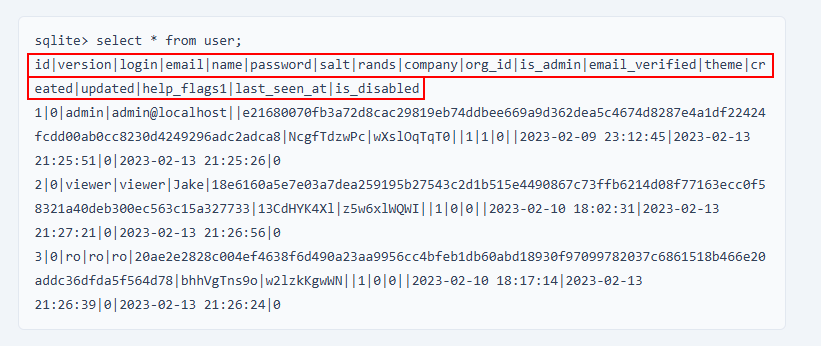
The values needed for hash preparation are identified.

Preparing Hashes for Hashcat
A small input file is created for the conversion script using the extracted Grafana password and salt values.

The conversion script is then executed, producing hashes in a hashcat-friendly format.

The formatted hashes are cracked with hashcat using mode 10900.
hashcat -m 10900 graf2hash.hashes /usr/share/wordlists/rockyou.txt --force
hashcat recovers a password for the user boris.

The recovered credentials are:
boris:beautiful1
SSH Access
The credentials work against the Grafana web login, but there does not appear to be anything immediately useful in the application. Since SSH is open, we reuse the same credentials there.
The login succeeds and we gain a shell as boris.

The user flag can now be read.
cat user.txt

Privilege Escalation
Sudo Enumeration
After gaining access as boris, we check sudo privileges.
sudo -l
The output shows that boris can run docker exec * as root.

This is a strong privilege escalation lead. Earlier, the arbitrary file read from the Grafana context showed no boris user in /etc/passwd.

However, from the SSH shell on the host, boris exists.

This difference suggests that Grafana is likely running inside a Docker container. The host has the boris user, while the container filesystem does not.
Docker Exec Access
Before abusing the permission, we review the available docker exec options.
sudo /snap/bin/docker exec -h

The next step is to identify whether the running Grafana container can be accessed directly. Since the application is Grafana, we test the container name grafana.
sudo /snap/bin/docker exec grafana 'whoami'
The command executes successfully inside the container.

We then enter the container as the root user.
sudo /snap/bin/docker exec -u root -it grafana bash
This gives us root privileges inside the Docker container.

Privileged Container Discovery
To look for quick container breakout paths, deepce.sh is executed inside the container.
The output immediately shows that the Grafana container is running in privileged mode.

A privileged container is dangerous because it can often interact with host devices. If the host disk is accessible from inside the container, we can mount it and modify the host filesystem while running as root inside the container.
Identifying the Host Disk
Back on the host, we inspect the mounted filesystems.
mount
The output shows /dev/xvda1, which appears to be the host system’s root disk.

Mounting the Host Filesystem in the Container
Before entering an interactive container shell again, we create a mount point inside the container.
sudo /snap/bin/docker exec -u root --privileged grafana mkdir /mnt/host
Next, we mount the host root disk into the container.
sudo /snap/bin/docker exec -u root --privileged grafana mount /dev/xvda1 /mnt/host
Now we enter the container with privileged access.
sudo /snap/bin/docker exec -u root --privileged -it grafana /bin/bash
From inside the container, the host filesystem is visible under /mnt/host.

We confirm this by reading the host /etc/passwd through the mounted path.

Modifying Host /etc/passwd
Since we are root inside the privileged container and the host filesystem is mounted, we can modify the host’s /etc/passwd file. First, we generate a password hash for the password pass123.
openssl passwd pass123

Using the generated hash, we append a new root-level user to the host /etc/passwd file from inside the container.
echo "hacked2:0f.2tijGGJuDw:0:0:/root/root:/bin/bash" >> /mnt/host/etc/passwd

Back on the host, the new user is visible in /etc/passwd.

We switch to the new user with the password pass123.
su hacked2
The new account has UID 0, giving us root access on the host.

The root flag can now be read.
cat /root/root.txt

Key Takeaways
Data shows how a known Grafana arbitrary file read vulnerability can expose enough local data to recover valid credentials. The initial foothold comes from cracking Grafana user hashes and reusing the password over SSH, while the privilege escalation path depends on a dangerous Docker configuration: sudo access to docker exec combined with a privileged container. Once the host disk is mounted inside the container, root inside the container effectively becomes root on the host.